Clio integration
Start a deed from any Clio matter
DeedScribe connects to your firm's Clio Manage account so a deed starts from the matter you already have. Open the matter in Clio and click Start deed in DeedScribe, or search your matters from inside the builder, and the client, the spouse, and the property address arrive already entered. When the package is ready, the deed and the transfer tax forms go back into that matter's Documents with one note recording what was sent.
Included on every plan. Clio Manage only — Clio Grow is not supported.
Install
Connecting Clio, once, by a firm owner
Open Settings → Integrations
Sign in to DeedScribe as a firm owner and open Integrations. The Clio card reads Not connected.

Settings → Integrations, before connecting. Click Connect Clio
You are handed to Clio's own sign-in. DeedScribe never sees your Clio password; what comes back is a token issued by Clio to your firm, which we store and refresh and which you can revoke from either side.
Approve the permissions on Clio's screen
Clio lists exactly what DeedScribe is asking for and who is granting it. Read the list — it is the one in the table below and nothing more — then allow it. Declining brings you back with nothing connected.
Confirm the card reads Connected
DeedScribe returns you to Integrations. The card now shows Connected, the date, and your Clio account id.
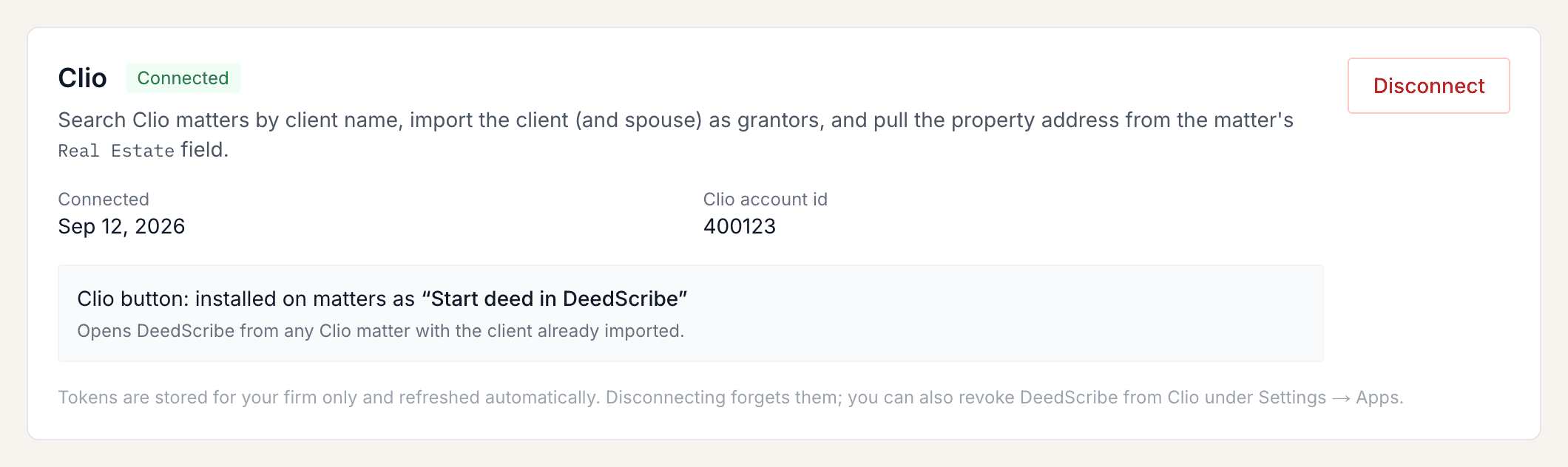
Settings → Integrations, connected. Captured on a throwaway test firm; the account id is not a real one. Check the Clio button installed
Connecting also adds the Start deed in DeedScribe button to your Clio matter pages, and the card says so. If that one step failed — it is attempted separately and never undoes the connection — the card offers Install Clio button; click it and the line changes to confirm the button is installed.
What each permission is for
- Custom actions — read and write
- Puts the Start deed in DeedScribe button on your matter pages, keeps it pointed at the right address, and deletes it when you disconnect. Clio has no field in its developer portal for registering that button once, so it has to be created through the API for each account that connects.
- Matters — read and write
- Search your matters, and read the one you pick along with its custom field values. Write is there for the single note DeedScribe leaves when you send documents back — Clio has no separate Notes permission, so a note on a matter needs matter write.
- Documents — read and write
- Upload the generated deed and transfer tax forms into that matter's Documents.
- Contacts — read
- The client's and the spouse's name and mailing address. Clio requires both Matters and Contacts to read a matter's relationships, which is how the spouse is found.
- Custom fields — read
- Read your firm's custom field definitions so the property address can be matched by its name — the Real Estate field — rather than a hard-coded id that would differ from firm to firm.
DeedScribe does not ask for, and cannot read, your billing and trust accounting, your calendars, your tasks, or your communications. Those permissions are left unticked on the application itself, so the token your firm issues cannot reach them even by mistake.
In Clio
Start a deed from a matter
Clio groups an app's custom actions under a matter's More actions menu. On the matter dashboard: More actions → DeedScribe → Start deed in DeedScribe. It is not on the matters list, not on contacts, and not in the left navigation.
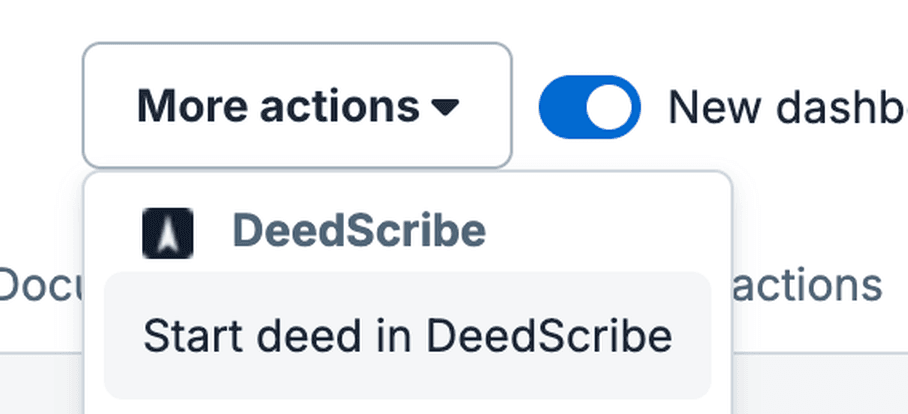
Clio opens DeedScribe in a new tab. If you are signed out you sign in first and land where you were going. DeedScribe then creates a draft deed linked to that matter, with the client as grantor, the spouse as a second grantor when the matter has one, and the property address from the matter's Real Estate field. A banner at the top of the builder lists what was filled and what the matter did not have.
Click it twice and you do not get two deeds: if your firm already has an open draft on that matter, DeedScribe reopens it.
In DeedScribe
Or import from inside the builder
On the Parties & details step, the Import from Clio card searches your matters. Type two or more characters of the client name or the matter number, pick the matter, and the client, spouse, property address, and matter reference come across.
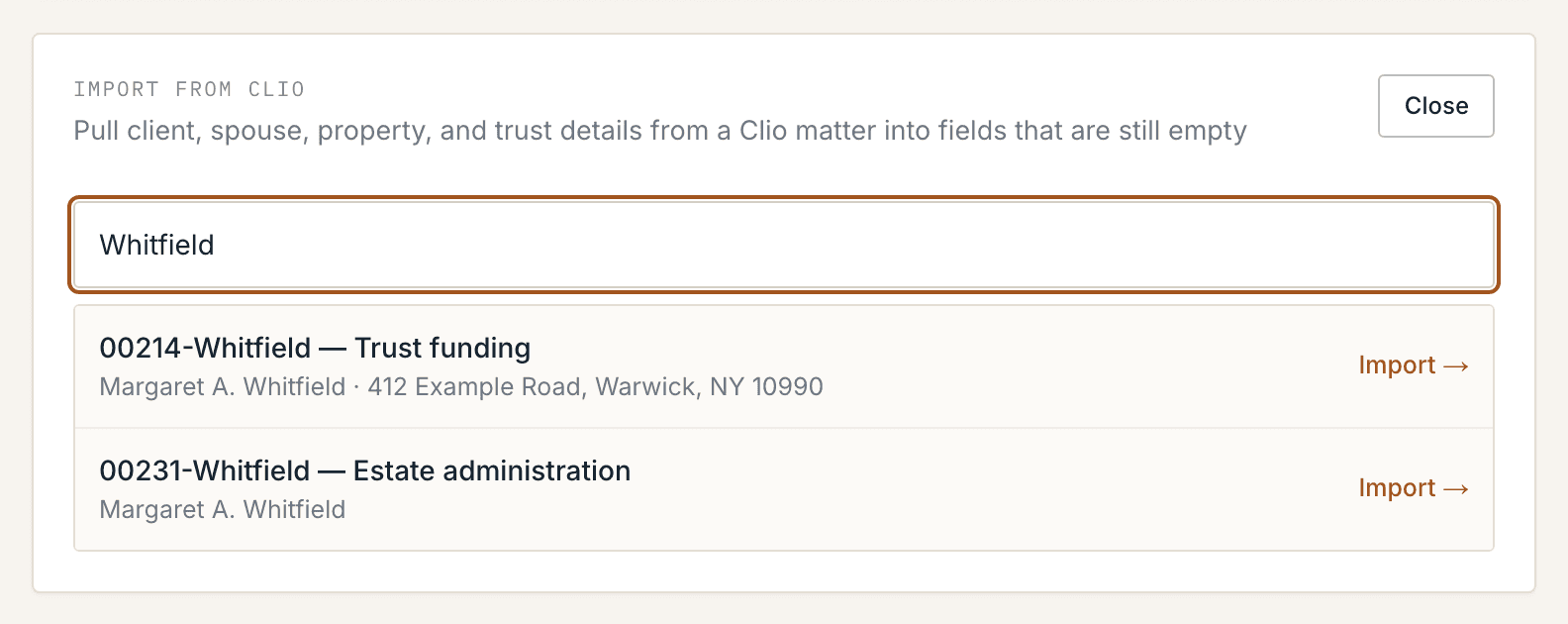
A Clio value only ever lands in a field that is empty. Anything you have already typed stays exactly as you typed it, and the card tells you which is which afterwards — a Filled from Clio list, a Left as you entered list, and the matter's gaps. You can Unlink the matter or Change matter at any point without losing your work.
Data
What comes across, in each direction
- Matter name and display number
- Client name, mailing address, email, phone
- Spouse, from the matter’s relationships (spouse, wife, husband, partner) or the Spouse custom field — with the spouse’s own address when they have one
- Property address, from the matter’s Real Estate custom field, folded from Clio’s multi-line field to one line
- Trust name and trust date, when your firm keeps custom fields for them — Clio ships no such field, so we map yours by name on request
- The documents you ticked, uploaded into that matter’s Documents
- One note. A single document reads “Quitclaim Deed.docx generated in DeedScribe on September 12, 2026”; a batch reads “DeedScribe sent 3 documents: Quitclaim Deed, TP-584, RP-5217”
- Nothing else. No matter field is edited, no contact is created or changed, no task, no calendar entry, no time entry
Reads happen only when you click Import, or the Clio button on a matter. Writes happen only when you click Send to Clio. Nothing syncs in the background: there is no scheduled job, no polling, and no webhook pushing records either way. Between those clicks DeedScribe makes no call to Clio at all.
Send back
Putting the package on the matter
On the Generate step, when the deed is linked to a matter and Clio is connected, a bar above the document list names the matter and carries one button counting what you have ticked — Send 3 to Clio. Every row also has its own Send to Clio button beside its download button, for sending one document on its own.
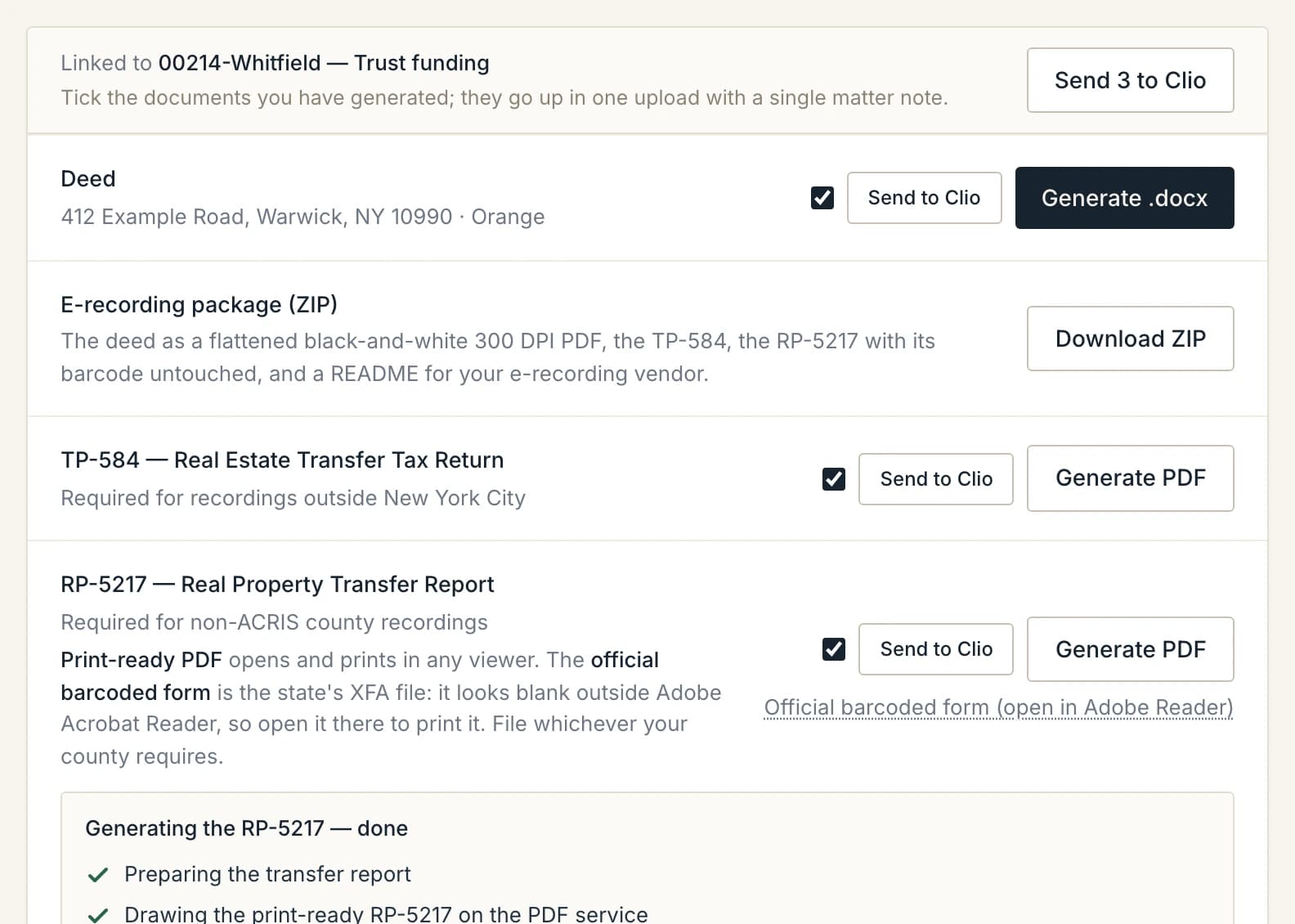
A row is tickable once its document has actually been generated in this session; before that the box is disabled and says so. Sending several sends them in one request on purpose, so the matter gets one note rather than one per document. Each row then reads Sent 2:14 PM, and the bar ends with a count — 3 of 3 sent — Deed, TP-584, RP-5217. If one upload fails the others still land, the note names only what landed, and the summary says what did not.
Disconnecting
Ending the connection from either side
In DeedScribe: Settings → Integrations → Disconnect. Your firm's access and refresh tokens are forgotten, and the Start deed in DeedScribe button is removed from your Clio account. Nothing is deleted in Clio and nothing is deleted in DeedScribe — deeds already linked keep the matter reference, so reconnecting picks up where you left off.
From Clio: revoke DeedScribe under Settings → Apps. Clio tells DeedScribe, and the connection disappears here on its own — there is nothing to clean up afterwards.
Questions firms actually ask
- The matter has no property address. Does the import fail?
- No. DeedScribe imports what the matter has and tells you what it did not: the card lists what was filled and names each gap. Take the property from the prior deed you upload, or find it in Parcel Search and start from the parcel. If you keep the property somewhere other than a field named Real Estate, tell us the field name and we will map it.
- Does this work for New York City matters?
- Yes — the Clio half is identical. What differs is the package: Kings, Queens, Bronx and New York e-record through ACRIS and file the transfer tax online, so DeedScribe drafts the deed only, and Richmond records with its own County Clerk on the NYC forms. Whatever DeedScribe generates is what you can send back to the matter.
- Who can connect it, and who can use it?
- Only a firm owner can connect or disconnect Clio, and it is one connection for the whole firm. After that any member can search matters, import a matter into a deed, and send documents back. A member who opens Integrations sees the status and nothing to click.
- Does DeedScribe keep a copy of the documents it sends?
- No. Each document is generated when you ask for it, passed straight through to Clio, and never written to our storage. A prior deed you upload is read in memory and discarded when the request finishes. The rest is on the Security page.
- What happens to the link if the matter is closed?
- The deed stores the matter's Clio id, not its name, so the link survives a rename or a close, and the matter's current name is read again when you reopen the deed. If Clio declines a write to a closed matter, DeedScribe shows you Clio's answer on that document's row — the download always still works, so a closed matter never blocks a recording.
Something not covered here? The support page has a form, and Security covers data handling in full.
See the builder before you connect anything
The demo runs the real builder on a fictional deed — no account, no upload, no Clio.